Keep unwanted content out.
Block covered ads, tracker requests and distracting page elements before they interrupt your browsing.
Explore blocking controls →Privacy for the people.
Ad and tracker blocking with privacy controls you can adjust. Choose your browser, explore the controls, and make the web feel like yours.
Try the interactive previewDesktop Chrome and Firefox. No subscription. No usage analytics.
On your phone? Open this page on your computer to install.
Start with the everyday benefits. Explore individual protections when you want the detail.
Block covered ads, tracker requests and distracting page elements before they interrupt your browsing.
Explore blocking controls →Choose controls for fingerprinting signals, tracking links, cookies and browser leaks. Keep the settings that suit your browsing.
Understand your privacy →Pause protection or whitelist a site when you need to. Preview the latest per-site rules, search and Undo controls in the guided tour.
Try the site controls →Feature availability and interface controls vary by published browser build. See current release notes.
100+ ad networks blocked at the browser-engine level — video pre-rolls, overlays, banners, promoted feed items. Pages load cleaner and faster.
In plain English: Ads never even get downloaded, so pages load faster and you don't see them.
Under the hood: Uses the browser's own declarativeNetRequest engine with 100+ ad-network domain rules — the browser blocks the request itself before it ever reaches the page.
Behavioral heuristics catch dynamically-rotating ad URLs that static blocklists miss on their own.
In plain English: Catches sneaky ads that change their web address every few minutes specifically to dodge blockers.
Under the hood: Runs behavioral heuristics on the page itself to catch dynamically-rotating ad URLs that a static blocklist can't keep up with, without touching normal video or script traffic.
Unmasks trackers disguised as first-party requests via CNAME cloaking — a technique built to slip past ordinary blockers.
In plain English: Some trackers disguise themselves to look like they're part of the website you're on — this unmasks and blocks them anyway.
Under the hood: Blocks known CNAME-cloaked tracker domains that use DNS tricks to appear first-party, closing off a technique specifically built to slip past ordinary ad blockers.
Blocks the invisible background reports websites send about your behavior to analytics and crash-reporting endpoints.
In plain English: Stops the site from quietly reporting your activity to outside analytics or crash-tracking companies.
Under the hood: Blocks known analytics and crash-reporting endpoints via declarativeNetRequest rules, kept separate from the ad and tracker lists.
Blocks Google Fonts, Typekit, and FontAwesome CDN requests — a common, quiet fingerprinting surface.
In plain English: Blocks requests to Google Fonts and similar services — a subtle, lesser-known way sites can help identify your browser.
Under the hood: Blocks fonts.googleapis.com, fonts.gstatic.com, Typekit, and FontAwesome CDN requests at the network level.
Adds subtle noise to canvas, audio, and hardware signals so your browser stops being a unique ID.
In plain English: Makes small, invisible changes to how your browser reports itself, so trackers can't build a unique "fingerprint" to follow you across sites.
Under the hood: Adds subtle, session-consistent noise to canvas/WebGL readbacks and audio/hardware API outputs, so the real underlying data never reaches the page.
Stops sites from discovering your real IP address, even behind a VPN.
In plain English: Even with a VPN on, some video-call technology can accidentally reveal your real location — this closes that gap.
Under the hood: Filters WebRTC connection candidates in real time, only allowing relay candidates through and blocking the ones that would otherwise expose your real IP.
Sites you click through to no longer learn exactly where you came from.
In plain English: When you click a link, the site you land on normally sees exactly where you came from — this trims that down.
Under the hood: Strips or reduces the Referer header on cross-site requests via declarativeNetRequest header-modification rules.
Strips utm_*, fbclid, gclid, and 30+ more tracking parameters from every URL.
In plain English: Cleans the junk tracking codes out of links so they don't end up in your browsing history or in a link you share.
Under the hood: Rewrites the current URL and every on-page link, removing utm_*, fbclid, gclid, and 30+ other known tracking parameters.
Skips the tracking hop on Google, Facebook, and LinkedIn redirect links — straight to the real destination.
In plain English: Skips the hidden "tracking stop" some links make on the way to where you're actually going.
Under the hood: Decodes known tracking-redirect link formats and sends you straight to the real destination URL instead of bouncing through the tracker first.
Clears tracking cookies on tab close. Site-by-site exceptions keep you logged in where you choose.
In plain English: Deletes tracking cookies when you close a tab, so advertisers can't recognize you next time — while letting you stay logged into sites you trust.
Under the hood: Clears a site's cookies when its last tab closes, with a domain whitelist so chosen sites keep you signed in.
Dismisses cookie pop-ups automatically — and rejects non-essential tracking by default, never accepts it.
In plain English: Automatically dismisses those "we use cookies" pop-ups for you — and always picks "reject," never "accept," on your behalf.
Under the hood: Detects major consent-platform banners (OneTrust, Cookiebot, TrustArc, and more) and clicks each one's Reject/Decline control if one exists; if not, it removes the banner without clicking anything.
Removes invisible 1×1 tracking images embedded in pages before they can report back.
In plain English: Removes invisible 1-pixel images that exist purely to log that you viewed a page.
Under the hood: Scans the page for tiny (typically 1×1) images matching known tracking-pixel patterns and removes them before they load.
Removes embedded tracker and social frames — share buttons, chat widgets, and the like.
In plain English: Blocks the hidden trackers riding along inside "share" buttons and chat widgets embedded on pages.
Under the hood: Removes embedded iframes from 30+ known tracker, social, and chat-widget domains (Facebook, X, Drift, Intercom, session-recording tools, and more).
Automatically prefers encrypted connections wherever the site supports them.
In plain English: Automatically switches to the secure, encrypted version of a site instead of the unencrypted one, wherever it's available.
Under the hood: Uses the browser's native upgradeScheme action to force HTTP→HTTPS on a curated list of sites known to support it.
Blocks YouTube ads and hides short-form clips, sidebar recommendations, end cards, and autoplay on YouTube and other streaming sites. Disables the promoted clutter. Just the video.
In plain English: Blocks pre-roll, mid-roll, and overlay ads on YouTube, and strips out short-form clips, autoplay, end-card clutter, and sidebar recommendations on YouTube and other streaming sites so you just watch the video you clicked.
Under the hood: Removes YouTube's ad schedule before the player reads it, hides short-clip shelves and recommendation UI, and disables autoplay via targeted removal on supported video sites.
Downloads a public tracker list while protection and Auto-Sync are enabled. Normal connection information is visible to the provider. See how it works ↓
In plain English: Downloads a public tracker list when protection and Auto-Sync are enabled. You can turn Auto-Sync off.
Under the hood: Fetches public EasyPrivacy data from easylist.to on startup and on a daily schedule. Requests omit cookies and referrers. The provider sees normal connection information, including your IP address; browsing reports are not attached.
Automatically reduces background scanning when your laptop is running on battery.
In plain English: Eases off background scanning when your laptop is low on battery, so protection doesn't drain it faster.
Under the hood: Monitors the browser's Battery Status API and reduces scanning frequency when battery is below 20%, or below 40% while unplugged.
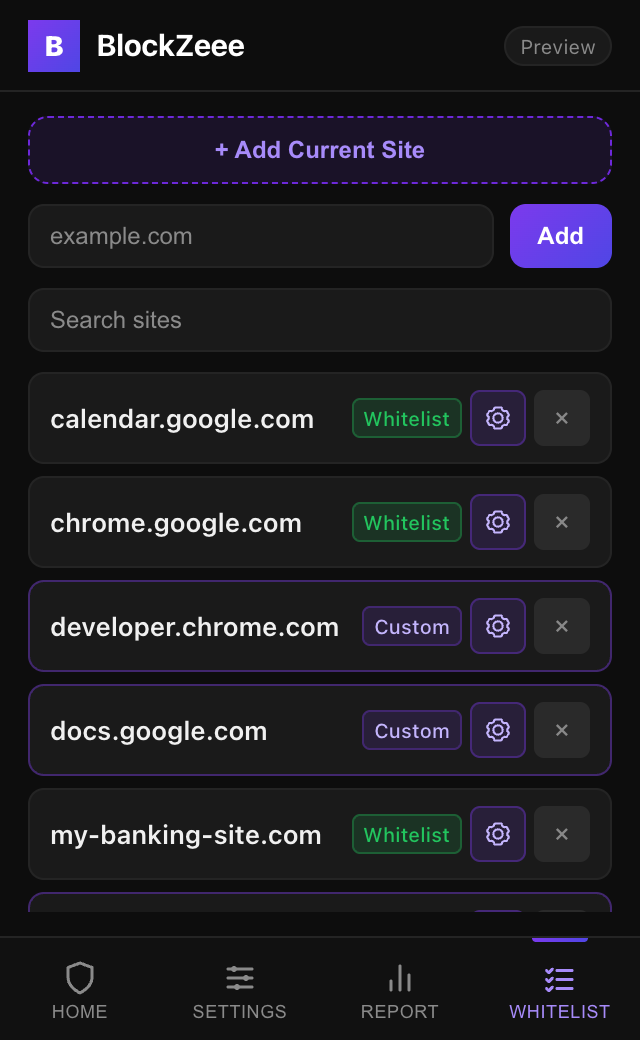
The latest interface preview includes 16 site-level switches. Current store controls vary by browser; see the release notes before installing.
In plain English: Don't want to completely disable protection just because one site breaks? You can toggle off only the specific feature that clashes, keeping ads, trackers, and fingerprinting blocked everywhere else.
How it works: Custom rules override your global settings for that site. Whitelisting takes priority and also covers subdomains. Turn it off to resume your saved rules. Search longer lists and use Undo to restore a removed entry.
Explore the latest interface with sample sites. Nothing here changes your installed browser protection.
Sample activity illustrates the report and pause controls. Counts are illustrative.
Latest interface preview Store builds may have different controls. Check release availability ↗
Sample data · resets when you reload
Open the preview on its own ↗Install from the official Chrome or Firefox store on your computer.
Keep the toolbar icon nearby so you can see activity and pause protection.
Start with the defaults. Adjust protection if a site needs a different approach.
Clear controls should come with clear answers.
Protection features use site domains, page structure and selected browser or player signals to block requests and apply your choices.
Settings, site exceptions and activity reports are handled in your browser. The extension has no usage-analytics or browsing-report upload service.
Auto-Sync downloads public EasyPrivacy data while enabled. Requests omit cookies and referrers; the provider receives normal connection information. Help and store links open ordinary pages.
Choose the approach you prefer. These descriptions summarize each project's documented focus.
| Tool | Main focus | Explore |
|---|---|---|
| BlockZeee | Ad blocking with configurable privacy controls and site exceptions. The tour previews our latest interface. | Choose your browser ↗ |
| uBlock Origin | A general-purpose content blocker with filter lists and advanced filtering controls. | Official project ↗ |
| uBlock Origin Lite | A Manifest V3 content blocker with browser-enforced filtering and selectable filtering modes. | Official project ↗ |
| Privacy Badger | EFF's tracker blocker, focused on blocking or restricting third-party tracking. | Official project ↗ |
Descriptions checked November 6, 2026. Follow the project links for current browser support and feature details.
Free desktop installation from the official stores.
Store version 3.7.70
Chrome's current listing was updated October 28, 2026. The tour includes newer interface updates that may differ from the store build.
Open Chrome Web Store ↗Store version 3.7.10
The published Firefox build has global controls and full-site whitelisting. The tour's custom profiles, search and Undo are interface previews.
Open Firefox Add-ons ↗Store versions checked November 6, 2026. The interactive preview is separate from the package each store currently provides. Read browser-specific release notes ↗
On a phone or tablet? Open this page in desktop Chrome or Firefox to install.
The latest interface preview includes per-site custom rules. Open Whitelist and select the gear icon beside a domain. Turn off Whitelist this site to edit individual protection rules; saved rules resume when whitelisting is turned off. The tour also previews search and Undo. Current Chrome and Firefox store builds can differ. Check the browser release notes to see which controls are available in the version you install.
Pause BlockZeee and compare before changing a site exception. Cookie Cleaning can end a site session after its last relevant tab closes, while Fingerprint Protection changes selected browser signals. You can turn either feature off in Settings. A Whitelist exception turns off all BlockZeee protections on that domain, so add one only when that is the behavior you want.
Cookie Cleaning can delete eligible session cookies after the last tab using them closes; cookies used by other open tabs are preserved. To keep those sessions, turn Cookie Cleaning off in Settings. That leaves other enabled protections running. A Whitelist exception is broader and disables all BlockZeee protections on that domain.
Pause Protection and reload the page to compare. If BlockZeee is contributing, add the affected domain under Whitelist, then turn protection back on. The exception applies to that domain; other eligible sites receive your enabled protections again.
Blocking covered ad and tracker requests can reduce network work. Results vary by site and the protection features you enable.
Protection scripts inspect page, link and selected player information locally. Settings, site exceptions, counters and reports are handled in your browser; the extension does not upload passwords or browsing reports. Optional Blocklist Auto-Sync downloads public filter data without cookies or referrers, and the provider receives ordinary connection information such as your IP address. Welcome, help and store links also make normal page requests. Read the Privacy Policy for details.
BlockZeee combines network rules with YouTube-specific ad detection, concealment and skip/recovery controls. Results depend on the ad format and changes to YouTube. If a page has problems, pause protection and compare, or add a site exception. These controls do interact with the video player.
No catch. No ads inside the extension, no selling your data, no premium tier. Just free, forever. We built this because we were tired of being tracked — same reason you're here.
The interactive tour previews the latest interface using sample data. It does not change your installed extension, and the sample data resets on reload. Store releases may have different controls. The download section and release notes show the current Chrome and Firefox versions.
The installation path documented here is desktop Chrome and Firefox. On a phone or tablet, open this page on your computer to use the desktop store links. Mobile extension compatibility is not verified by this site.